Hi,
I've not received the product key. I'm not sure if I need to ask for a refund through paypal?
Please pm me asap.
Hi,
I've not received the product key. I'm not sure if I need to ask for a refund through paypal?
Please pm me asap.
Hello,
we have sent the license immediately at payment.
Please check your spam/junk folders. If you still cannot find the license, please just write us a mail from your PayPal email address, so that we can send it to this other email address.
Spam filters do not work well regularly, I am afraid.
Does this help?
Best regards,
Michael
Hello.
I download free version of Poker Ranger and tried to import predefined ranges from .prt files, but nothing happened (all default ranges in PokerRanger deleted and predefined ranges not imported).
Any suggestions how to solve this problem? Or maybe i choose incorrect way to import ranges (maybe in free version it's impossible)?
I consider to buy PokerRanger, because Power Equilab license expired soon)
Hello merekutio139,
it might be that the prt file is not well-formatted. It is standard behavior that the old ranges are overwritten by the ranges defined in the prt file that you import via the import button in the range selection dialog. However, if all ranges are deleted and no folders remain, a reset is necessary.
You can reset the range tree by navigation in your Windows Explorer to c:\users\%username%\appdata\roaming\elypson
There, you can delete the PokerRanger.ini file. Make sure that PokerRanger is closed while you delete it. Afterwards, you should get all of the predefined ranges back.
Then, just try to import the prt file once again via the hand selection dialog and the „Import“ button.
If this leads to the same result (no ranges imported, everything empty), we would assume that the prt file is malformed. You might send them to us, for example to pokerranger@elypson.com. We will gladly analyze it for you and, if necessary, repair it.
Does this help you?
Best regards,
Michael
Hello again,
finally, PokerRanger2 is released! As promised, we have done so on 31 December 2020, but we can now finally tell you more. We have a great range of new features like expected value trees, weighted ranges, multi-way support (up to 10 players), dockable/tabable/resizable widgets to perfectly use your screen, tree views for ranges with groups, a history window to go back and forth in your ranges, and much more... And PokerRanger2 is also available for MacOS now, one of the very few tools for MacOS at all. Of course, we will always jointly release updates for Windows and MacOS.
We create new content at the moment, for example on our new website. We have updated the opening post with new screenshots, new mentions of features, updated links, and answers to some new questions. We also have a section of frequently asked questions (FAQs) on our website.
We love to hear your feedback! We have integrated a lot of early feedback already and even released v2.0.1 recently. Due to our new development process, it is easier to react to feedback and integrate changes now, so please let us know what you truly desire and we will do our best to fulfil your wishes soon.
We are very pleased with our big new version and, although some time to transition might be needed, we are certain that it is easier to use, more intuitive, and (obviously) more powerful than PokerRanger1. To close the learning gap, our articles should help. If not, let us know, we love to give you detailed, individual explanations.
All the best and have a nice remaining weekend!
Michael
Love it! The docking feature allows me to configure my own "workspace", which is awesome. The 21-day trial is nice and the subscription pricing is very fair 
Dark mode.
Hi,
we have released 2.0.2. In this version, we have the infamous dark mode. You can activate it at will (independently of whether your OS supports it system-wide). We also added more solver input support. Parsing strings like [0.1234]AA[/0.1234] (more decimal places) works fine now. Contained in our update are also multiple bug fixes that you might enjoy.
Let us know what you think!
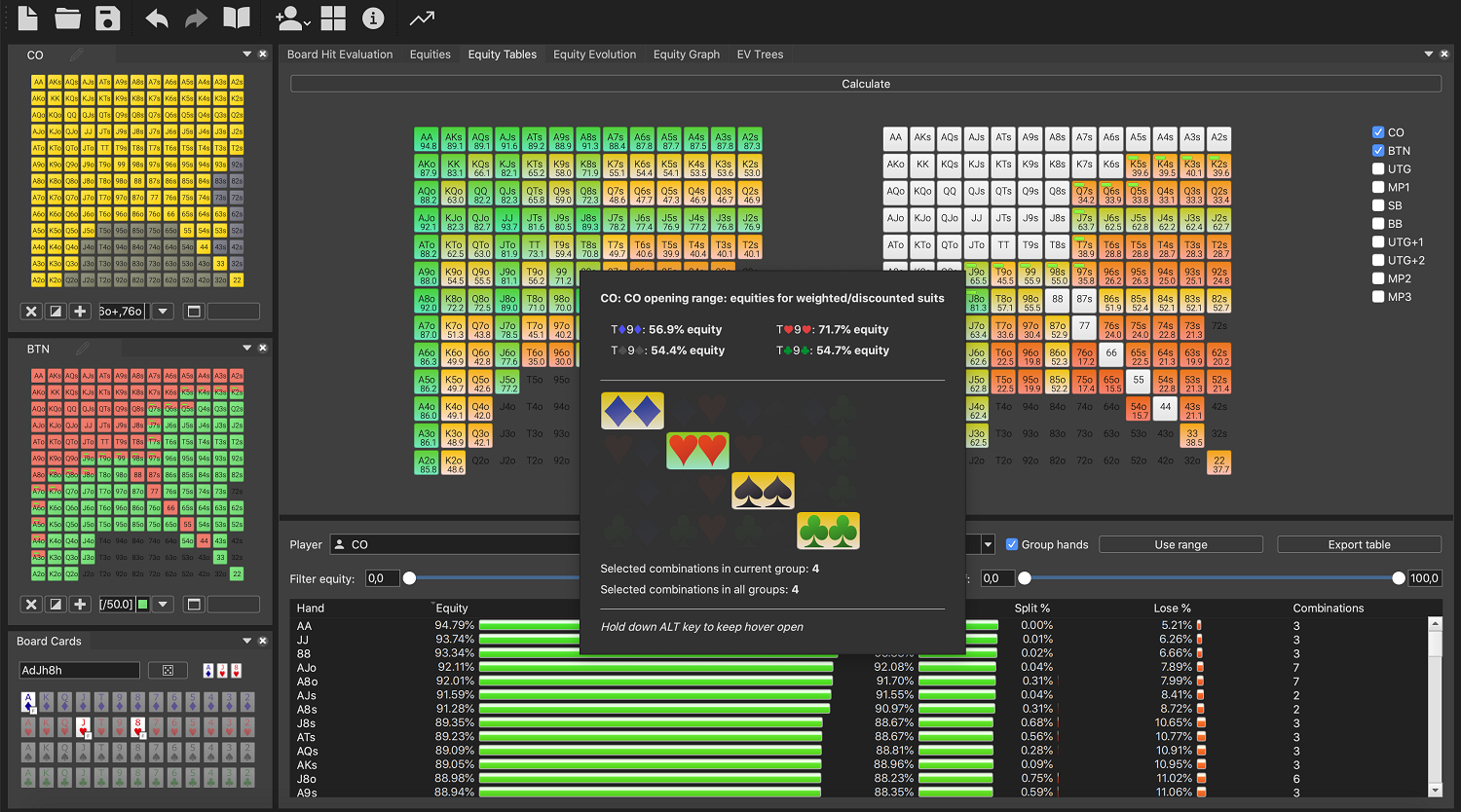
Like always: Free trial is free.
You can find more information on the official PokerStrategy news: https://www.pokerstrategy.com/news/pokerstrategy/Check-out-all-the-features-of-PokerRanger-2_116670/
At your service,
Michael
We provided release 2.0.3 now, are on Discord now (see on our website in the footer the link), and our early bird deal only lasts a few more hours!
Always note that you can use the deal now and get all updates later, too. So, if you think, PokerRanger2 is only 90% great but you would like to have this other feature... let us know! You will get it.
So, for this update, we have improved a few usability and stability things:
– Changed buttons in board hit evaluation view to show actual board/random cards evaluated
– Removed redundant board cards from board card widget
– Fixed rare issue that license would need activation at each PokerRanger start
– Fixed bug that PokerRanger would sometimes crash on specific layouts
– Accept more weighted ranges, mixing weights and no weightes, e.g.: [50]AA[/50]KK[50]QQ[/50] resulting in [100]KK[/100][50]QQ,AA[/50] automatically
– Make history view better readable in Windows dark mode

We hope that you like it.  Also, thank everyone for giving us so much input on follow-up features. We are on them!
All the best,
Michael
Hi again,
today, we release v2.0.4 of PokerRanger with many usability improvements and bug fixes. Just to name a few:
– Added support to import more ranges from other software via text, e.g. full Simple Postflop support
– Board hit evaluation tab has now more stable range hovers that keep staying open
– Added close button for tabs directly into the tab title
– Cards/hands can be deselected by using the left mouse button
– Made some texts clearer in board hit evaluation tab and equity evolution tab
– Fixed a bug that sometimes equity tables would not show results for specific positions
– Fixed a bug that sometimes suit hovers would not show colors of other groups
– Let PokerRanger close again when equity evolution/graph evaluation is still running
– Fixed a bug that custom sum / selected hands in board hit evaluation tab would not always show the correct number when in equity mode
– Fixed a bug that few gutshot draws were sometimes not acknowledged as such
Even more importantly, PokerStrategy's great coach Lemon offers a live coaching today together with me: https://www.pokerstrategy.com/news/content/Watch-Poker-Ranger-2.0-in-action-tonight_116938/
Make sure to join and win a free 3-month license!
All the best,
Michael
Hello,
this tool sounds interesting!
1) Is there also an EV view of - if it's more +ev to 4bet/ship or to just call the 3B from villain? (I've noticed you mentioned the 4B/Ship situation, but not sure if the alternative is just fold or the remaining option "call" is also covered)
2) With which other products/tools are you comparing yourself, or - are there other similar competitors/tools? Just as an information for myself, to be able to compare your tool against others on the current market, if there are any.
Thanks in advance!
BR
Hello Talmar,
1) In the EV view, you can indeed create something like this. For example, you can just choose to 4b/ship villains range with 50% weight and call the 3b with 50% weight of the hands. PokerRanger gives you expected value for both of these scenarios and you can compare. For the call of the 3bet, if you end the action here, then PokerRanger assumes that you will check any flop, turn, or river. But you can also create flop/turn/river actions here, either for a random flop, for specific flops, for multiple flops etc. So, you can analyse both of these situations and compare them with any option and complete control to design post flop or preflop actions.
2)
There are multiple tools out there. Maybe, one of the closest would be Flopzilla Pro (FZP). That said, PokerRanger has several benefits over it:
- equity per hand strength: PokerRanger tells you how much equity, e.g., a Pair has against another range. In FZP, you can only see the groups, their shares but not the respective equity
- coming with next update: automatic grouping of hands. PokerRanger automatically puts some hands into "very strong", others into "strong" etc., so it is very easy to get an overview of ranges immediately
- extensive grouping functionalities: You can subdivide your range with weights into multiple groups and subgroups and see colors for each of the groups. In this way, range management is extremely comfortable and many of our customers say it is the best tool to manage your ranges
- Expected value trees: FZP does not have this at all. You could compare this part to CardrunnersEV, but CardrunnersEV lacks many other of our features, of course
- Flexible design: For example, you can stack two player range matrices next to one another to change ranges both at the same time. You can also view results (like equity matrices) next to one another to compare them directly. Same for board hit evaluations, ranges etc.
- In general, PokerRanger is much more powerful when it comes to comparing two (or more, up to ten) players with respect to board hits, equity evolution, equity graphs etc.
- All functions during trial: FZP only shows limited features in the trial phase, so you cannot really test everything. For example, random flops.
- update time: Some of our customers say that they also switched because we offer better support and introduce changes that they wished for in a short time window. I think, the developer of FZP focuses on other products now from what I've heard
These are only few of the reasons why PokerRanger2 is superior. You can test PokerRanger2 for free for 21 days and get used to it.
Do you have any other questions? Do not hesitate to ask anytime here or via some of our channels!
All the best,
Michael
Hi,
sorry, the update took longer than expected. But the work carries fruits.
PokerRanger is now much faster at equity calculations. HU calculations for pure equity, board hit evaluations, equity matrices is in almost all cases INSTANT now. And in the board hit evaluation tab, you will see all HU changes to player hands and board instantly at any change, which makes evaluations even easier.
On top, there are now auto groups that subdivide ranges into very strong, strong, mid hands, draws, combo draws and the remainder. You don't need to configure anything, this comes out of the box (although it's, of course, customisable if you want). There is no other tool on the market that allows you to have the grouping function together with equity for each group (against the other players' ranges), especially not for 3 or more players in one concise view.
You can also use the software now on old systems that use OpenGL1 (like ANY AWS work station, for example).
There are many more features and fixed, the full release note list can be found here: https://www.pokerranger.com/change-log
There is also a very short video showing some of the new features:
As always, we are happy to hear any feedback, questions, or suggestions, so feel free to contact us anytime in any way!
Beste Grüße
Michael
Hi guys,
with this update PokerRanger2 offers a completely new feature, one that no other tool on the market offers. We built in directly upon customer request and they are very curious and happy about it.
This new feature allows to combine two of the main analysis features that PokerRanger offers: Equity graphs and groupings of hand types (into categories like "Very strong hands", "Strong hands", and so on). By PokerRanger2's nature, this multi-way feature allows to separate a range into these predefined hand-categories and the equity is plotted for each of them sorted by equity.
What's more, you can define custom groups, the same ones that we presented for board hit evaluations in the last large update. And a tooltip on each hand gives you an overview of the equity and the equity range/average equity within this category. Never has there been an easier way to get an overview of ranges combined with equities.
Apart from that, we also have some other performance improvements and fixed:
- Equity graphs for two players yield results now in few seconds (for two very large ranges, otherwise yet faster)
- Further UI improvements with regards to usability and looks
- Fixes of crash bugs that could occur on i3 or other old/not-so-feature-rich processors
- other fixes and optimizations
Only one example on how it could look like:
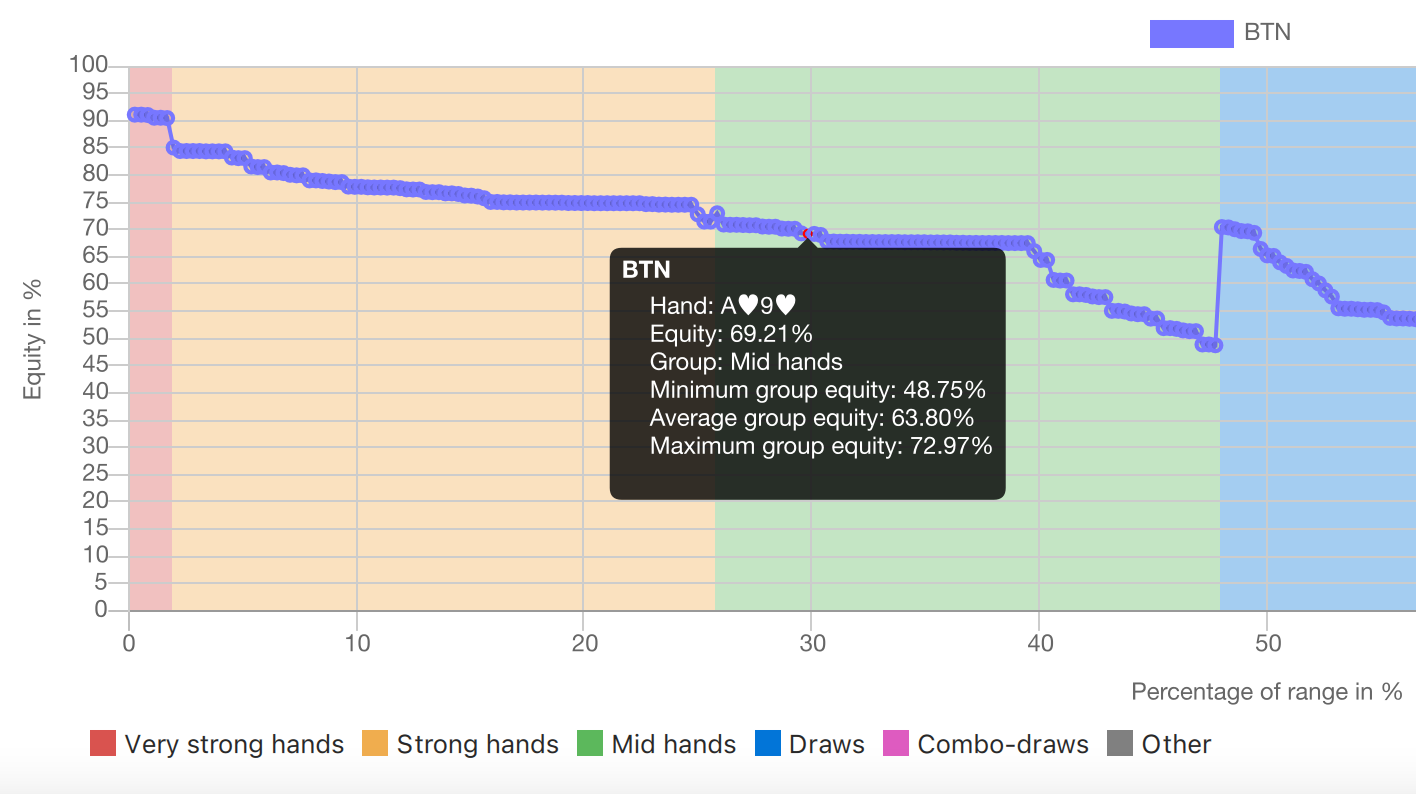
As always, the full release notes can be found on our homepage:> https://www.pokerranger.com/change-log
All the best,
Michael
Hi again,
we have added documentation about the board hit evaluations now. Create custom schemas to categorise "Very strong hands", "Draws", etc. These groups are also in use in the new equity graph feature now.
Just visit our homepage, click "Features / Docs" and click on the documentation link or directly go to detail articles by clicking on the links below the screenshots.
OR follow this link: https://pokerranger.com/board-hit-evaluation
Also, please take part in our survey on which feature YOU personally would like to see next: https://forms.gle/qposN1YhR9d9GAkw6
All the best,
Michael
Hey guys,
we have just now released v2.2.1. We have mainly fixed tons of bugs like layouts not being memorised, discounted combinations not being shown understandably, cut-off of the range matrix, and many more (check our change log, it also automatically appears if you just load the update).
However, we have also put in combinations to the board hit evaluation tab. This shows discounted combinations in an even clearer way. For example, if one player has AA,KK and you have a range of 22+, then KK,AA within 22+ is extremely discounted.
This effect is usually not captured by other tools.
So, again, we add to the range of unique features.
If you have any ideas, feedback, or questions, let us know anytime!
All the best,
Michael
Hi again guys,
so we have checked more thoroughly into one user's bug report and we are able to find some special cases for equity tables and general equity calculation that were slightly off. In the case of flop equity calculations for two players, when weights are involved, there were some small miscalculations in some specific cases, so indeed a bug and we are very thankful that a user found them. It is now fixed in interim update 2.2.2, while we are actually working on our new preflop trainer (included in the subscription).
We also improved our quality assurance system to cover these and similar cases to make sure that all is fine and will be more stable in the future, too.
We also gave a large cashback to said user for his help that we are very thankful for!
Best,
Michael
Preflop trainer
Thank your for your patience! In the last months, we worked on a feature that was on the wish list of some of our customers for a long time: A preflop trainer that solves problems other trainers have.
It sounds simple but each Poker player needs it. You might use your favourite solver to get the best ranges or rely on the poker site to provide you good starting hand charts. But you still need to get them into your brain to play the table optimally.
And it was never easier to train these ranges than now.
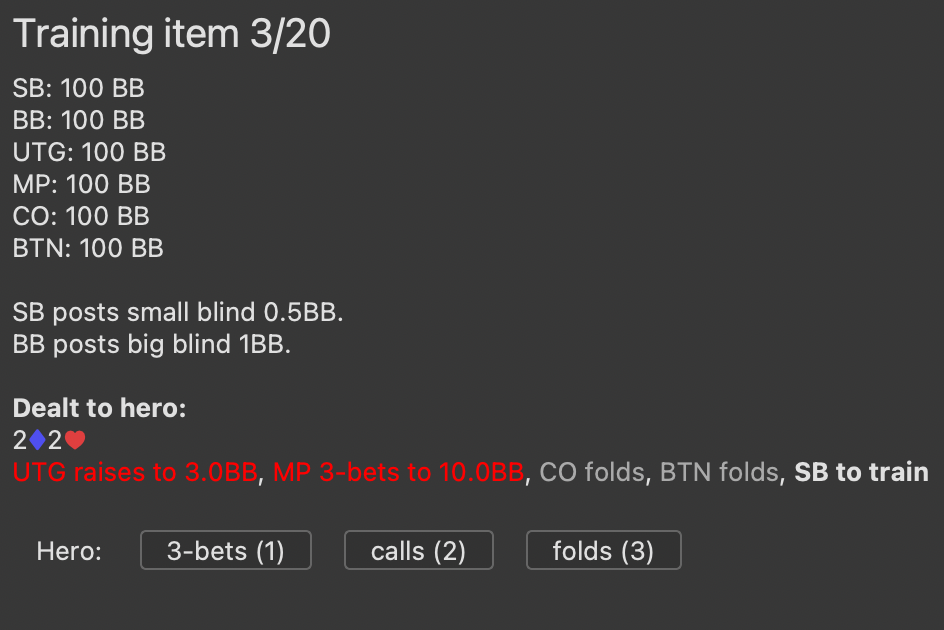
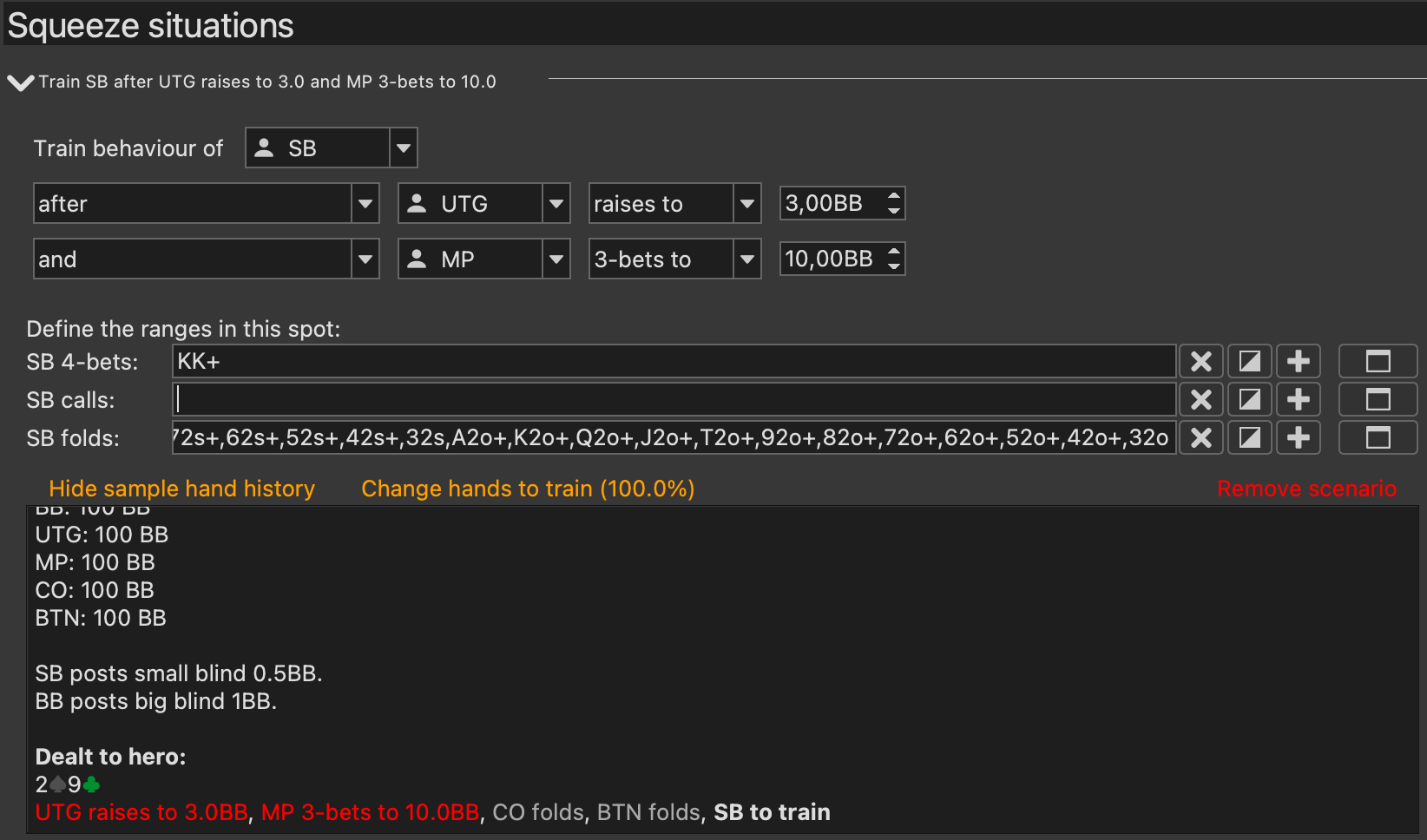
Use the usual, comfortable ways of putting your ranges into PokerRanger, create your trainings, and start training with some handy keyboard shortcuts for raise, call, or fold. This is not limited to these actions, you can also train 3-bet spots, 4-bet spots, and even squeeze spots. You can define ranges against one limper, multiple limpers, or whatever specific setup you want. You can then also limit the range to train because AA might anyways be a no-brainer.
And PokerRanger is the only tool that lets you specify different 3-bet ranges depending on the raise size.
Train preflop 3-bet / squeeze situations
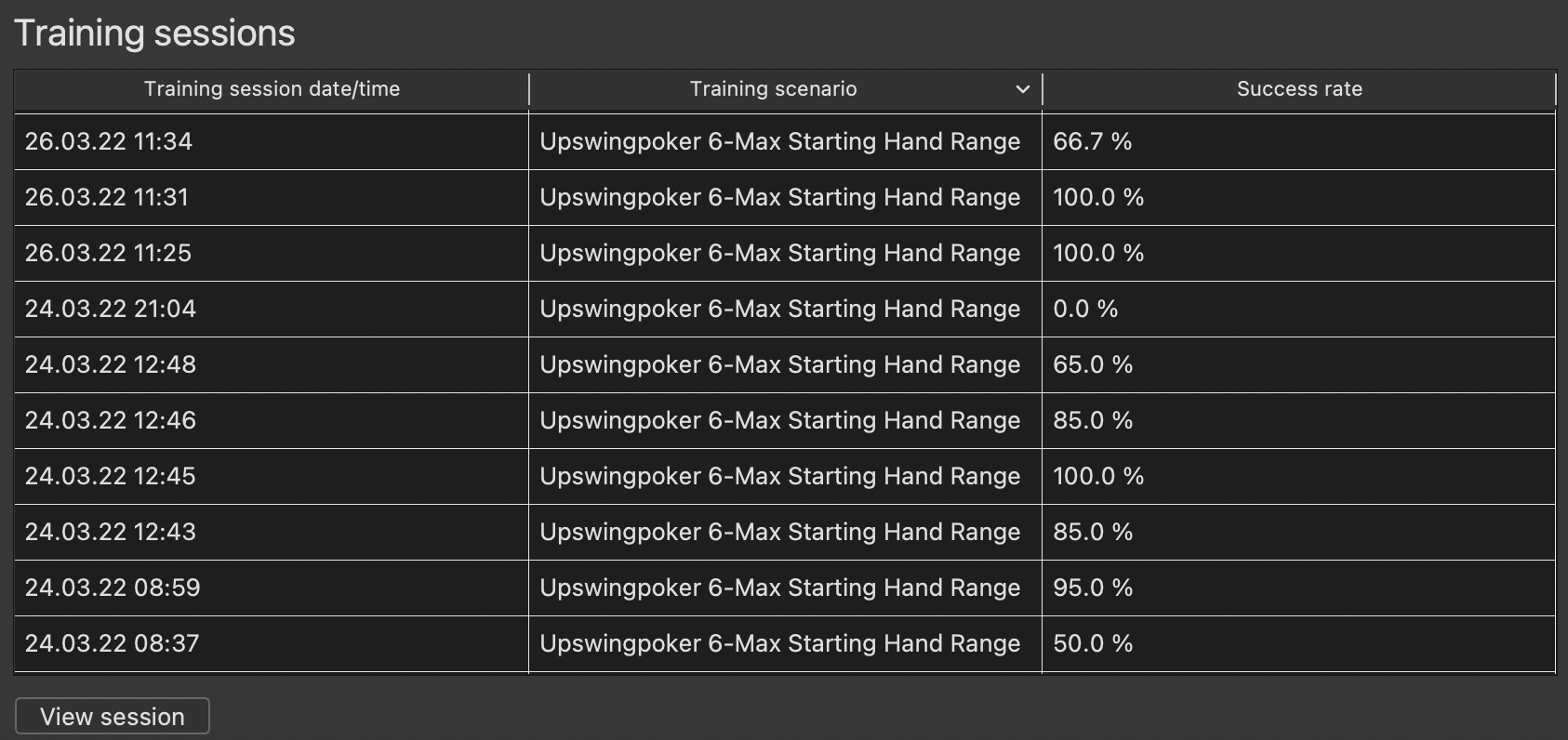
Track how you have trained your ranges over time. Have you some trouble hands? Have you some specific positions / spots that are harder than others? How has your success rate developed over time?
You can answer all of these questions easily with visual reports.
Also, PokerRanger comes with built-in ranges from our partner Upswingpoker for 6-max opening ranges. So you can try it out even without putting your ranges in. And - it's fun!
Let us know what you think and what you would like to see improved. More reports? More options? Ask us and consider it done.
The important links:
Kurze Slideshow
Dokumentation
Download
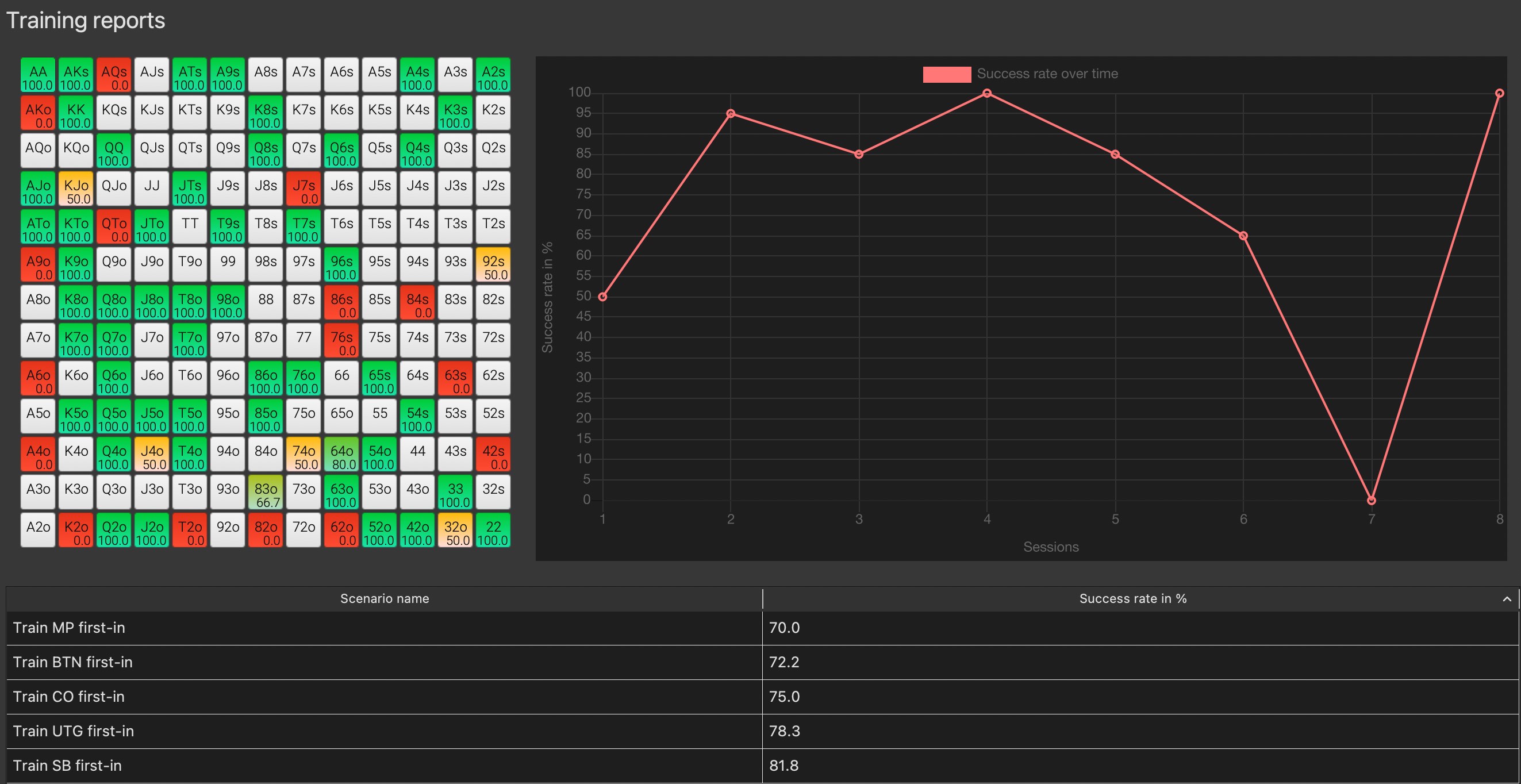
All the best,
Michael