


Hi, please, what underlined numbers and numbers in brackets mean?
Notifications
Clear all
Hand2Note
285
Posts
53
Users
58
Reactions
154.2 K
Views


Stats in brackets are stats versus Hero(you). So you can see specifically how players react and adapt playing vs you.

Can be turned off here
Spoiler

Set 99999 if you want to display it always

Hi, when I load a Hud it's messed up at the table. Hud appears at different players than it should be. If I try them manually move it doesn't help because he hud moves on all 4 tables but the names are messed up in different order. How can I fix it, please?

Hello. You can reset hud positions.
Please close Hand2Note and remove the file HudDeltas.cg or HudPositions.cg that is located in the folder C:\Program Files\Hand2Note\Config by default. After that open Hand2Note, sit at one table and wait for HUD to adjust automatically. After that you can move the panels to where you need them by holding right-click on the panel and dragging it.
Don’t open more than one table when arranging HUD for the first time.
Please note that your HUD consists of many different tables with different display conditions, then you need to place all these tables (as they appear) in the correct places by mouse. Only after that, they will appear where it is necessary.
Thank you for your reply. I deleted both files. HudDeltas and HudPositions.
I loaded one table and hud appeared, but even after several dozen hands it didn't adjust and the number of played hands is still the same.
Where are you playing?
If you are playing on PokerStars:
1) Open Hand2Note->Configuration->Rooms Reset settings to their default and Save
2) Open Hand2Note->Configuration->Rooms->PokerStars
Please set for all Preffered Seats the value of "1" It will be bottom centered seats for all the possible PS tables.
Spoiler
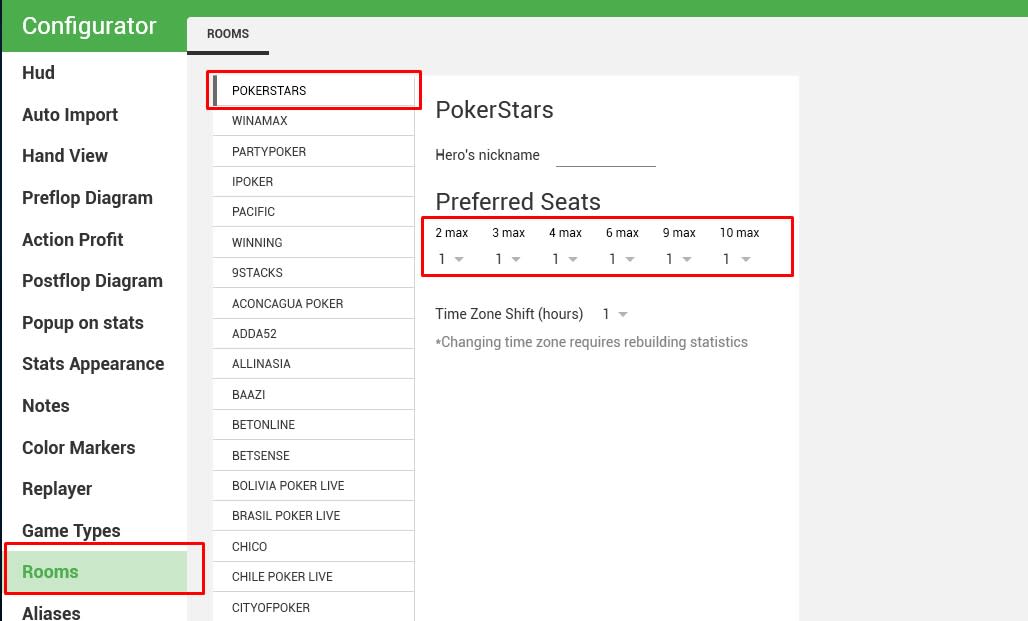
3) Please redo this procedure
Spoiler
Please close Hand2Note and remove the file HudDeltas.cg or HudPositions.cg that is located in the folder C:\Program Files\Hand2Note\Config by default. After that open Hand2Note, sit at one table and wait for HUD to adjust automatically. After that you can move the panels to where you need them by holding right-click on the panel and dragging it.
Don’t open more than one table when arranging HUD for the first time.
Please note that your HUD consists of many different tables with different display conditions, then you need to place all these tables (as they appear) in the correct places by mouse. Only after that, they will appear where it is necessary.
Awesome, it helped. Hud works perfectly now  Thank you.
Is there a way how to fix the hotkey issue? With the hud loaded hotkeys don't work.

Hello,
please can you help me with an issue? H2N does not show me HUD on more than 1 zoom table at pokerstars. Regular tables are ok. Zoom - if I open more than 1 table, the HUD freezes or is not shown. I tried all HUD fixing procedures I found.
Thank you a lot!! 🙂
Originally posted by Ihuarraquax
Hello,please can you help me with an issue? H2N does not show me HUD on more than 1 zoom table at pokerstars. Regular tables are ok. Zoom - if I open more than 1 table, the HUD freezes or is not shown. I tried all HUD fixing procedures I found.
Thank you a lot!! 🙂
Most often HUD on Zoom is not working because it might be blocked by third party antiviruses. It is usually recommended to do the following:
Please download the latest PokerStars client and reinstall it. Right now, not to troubleshoot it later.
Then please follow these steps:
1. Please install all the latest windows updates
2. Turn off or uninstall your antivirus if you have one
3. Add room folder and hand2note folder to the windows exclusions https://support.microsoft.com/en-us/windows/add-an-exclusion-to-windows-security-811816c0-4dfd-af4a-47e4-c301afe13b26
4. Restart
5. Always launch Hand2Note and your room as an administrator
6. Sit down on zoom table and play some hands to test it out
Thank your for your answer! Unfortunatelly it didnt help  Anyway I canot see a way it can be antivir related when on one table of zoom everything is OK and on more tables it freezes or disapear
Please update you PS client to the latest version. Make sure that you use H2N 3.3.1.32 version.
Please try the following: http://hand2note.com/Help/pages/Troubleshooting/Other/#hand2note-freezes-or-works-slowly
If it wont help please proceed with the full reinstallation of Hand2Note:
Spoiler
Please reinstall Hand2Note using this guide http://hand2note.com/Help/pages/Troubleshooting/Reinstallation/
Step 2 save your settings (The following folders Config,Notes,MarkedHands)You can skip database deletion.
Run Hand2Note in the default configuration (do not restore your config first), enter the license key and please configure autoimport (if it is required) and check if the problem persists that occurred before reinstalling.
For the testing purposes please create a new database http://hand2note.com/Help/pages/Database/#creating-a-new-database
Sit down at the tables and play some hands with a default Hand2Note settings and a HUD.If everything is working you can restore your settings.

Hey guys
Does this software have filters like others programs out there for chipev stats and other details?
Is there a promo code or special trial for poker strategy members?
All the best