



Hi, i appear to be having trouble with the hand range matrix within equilab. I click the icon to bring up the hand range matrix/ selector and nothing happens, i have tried uninstall/reinstalling it/ repairing it etc and nothing changes. Can someone help me please Thankyou.
Notifications
Clear all
8 replies


Hi regulatah,
Welcome to PokerStrategy.com! 
There is an answer to this in the forums someplace -- I'll try to find it.
Until I find it, try this:
 Click the icon to bring up the hand range matrix
Immediately hold down the alt key and tap the space bar.
Look for something like this:
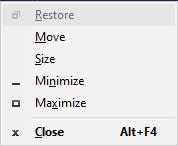
Near the edge of your screen
If you see it, click "Move" -- you should now see a 4-headed arrow near where the menu was.
Using the arrow keys on the keyboard, move the 4-headed arrow toward the centre of your monitor.
When the 4-headed arrow is near the centre of your screen, press Enter
If that doesn't work, be patient while I locate the answer.
Best of luck :gl:,
 VS
VS
Hi regulatah,,
The instructions I was thinking of applied to a different problem.
If you have difficulty making the solution work, there is another way, but it involves editing the equilab settings file.
Let me know how it goes...
VS


Originally posted by SqaurePants
oh my god .
thanks yo
it worked
Hi SqaurePants,
Welcome to PokerStrategy.com
That's what we're here for 
This happened to me as well.
The workaround worked fine.
The reason in my case was that I used 2 monitors and then unplugged one monitor. After plugging in the 2nd monitor again I saw the matrix window again and was able to move it to my 1st monitor (main screen).
Originally posted by Gurkha
This happened to me as well.
The workaround worked fine.
The reason in my case was that I used 2 monitors and then unplugged one monitor. After plugging in the 2nd monitor again I saw the matrix window again and was able to move it to my 1st monitor (main screen).
Multiple monitors are a blast.
I'm glad you got it fixed
Hey, I had a similar problem @gurkha, in my case I reorganized my screens at screen settings and then the range tab disapear lol. It went back when I changed the screens priority again. Thanks for this post! I was already expecting some kind of bug lol
Originally posted by fukhash
Hey, I had a similar problem @gurkha, in my case I reorganized my screens at screen settings and then the range tab disapear lol. It went back when I changed the screens priority again. Thanks for this post! I was already expecting some kind of bug lol
Yeah, Equilab's free version is no longer supported, so it is possible that there are lurking bugs.
Glad it worked out for you!