



Is it possible to delete e. G. The stoxtrader ranges and so on?
If yes please tell me how
Equilab free
Windows 10 os
Is it possible to delete e. G. The stoxtrader ranges and so on?
If yes please tell me how
Equilab free
Windows 10 os
Hi bksknowsbest,
Yes it is.
Assuming that your Equilab is installed in the same place mine is, you will find this file:
C:\Program Files (x86)\PokerStrategy.com\PokerStrategy.com Equilab\PreflopPredefined.iniMake sure you save a copy of the original.
you can edit that file using a plain text editor such as Notepad. The free Notepad++ is a better choice since there are a lot editing tools available.
The file is organized into sections:
[Predefined]
Pokerstrategy.com - Fixed Limit!3
.Open Raising Chart (ORC)
..UTG {99+, AJs+, KQs, AQo+}
..UTG w/o Cap {JJ-99, AQs-AJs, KQs, AQo}
..UTG+1 {99+, ATs+, KQs, AQo+}
..UTG+1 w/o Cap {JJ-99, AQs-ATs, KQs, AQo}
..UTG+2 {88+, ATs+, KJs+, AJo+, KQo}
..UTG+2 w/o Cap {JJ-88, AQs-ATs, KJs+, AQo-AJo, KQo}
..MP1 {77+, A9s+, KJs+, QJs, AJo+, KQo}
..MP1 w/o Cap {JJ-77, AQs-A9s, KJs+, QJs, AQo-AJo, KQo}
..MP2 {66+, A8s+, KTs+, QTs+, JTs, ATo+, KJo+}
..MP2 w/o Cap {TT-66, AQs-A8s, KTs+, QTs+, JTs, AQo-ATo, KJo+}
..MP3 {55+, A5s+, K9s+, Q9s+, J9s+, T9s, A9o+, KJo+, QJo}
..MP3 w/o Cap {99-55, AQs-A5s, K9s+, Q9s+, J9s+, T9s, AQo-A9o, KJo+, QJo}
..CO {44+, A2s+, K8s+, Q8s+, J8s+, T9s, 98s, A7o+, KTo+, QTo+, JTo}
..CO w/o Cap {99-44, AJs-A2s, K8s+, Q8s+, J8s+, T9s, 98s, AQo-A7o, KTo+, QTo+, JTo}
..BU {33+, A2s+, K2s+, Q6s+, J7s+, T8s+, 98s, 87s, 76s, A2o+, K7o+, Q9o+, J9o+}
..BU w/o Cap {77-33, ATs-A2s, K2s+, Q6s+, J7s+, T8s+, 98s, 87s, 76s, AJo-A2o, K7o+, Q9o+, J9o+}
..SB {22+, A2s+, K2s+, Q2s+, J2s+, T3s+, 94s+, 85s+, 76s, A2o+, K3o+, Q4o+, J5o+, T6o+, 97o+, 87o}
..SB w/o Cap {55-33, A8s-A2s, K2s+, Q6s+, J7s+, T8s+, 98s, 87s, 76s, A9o-A2o, K7o+, Q9o+, J9o+}
.3-betting vs. ORC
..vs. UTG Open Raise {JJ+, AKs, AKo}
To remove an entire section, just delete it.
I tested this, and it works:
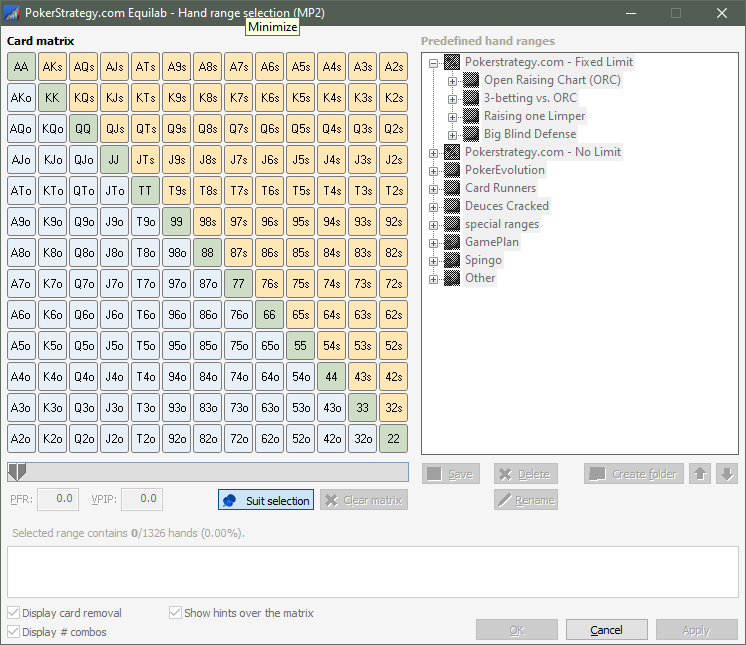
You could even edit the ranges, or add your own, but there is already a way to add your own (such as the Spingo section in the image above).
Important:
 You need to be an administrator on your computer to edit this file, since the program files folder is protected by the OS
I knew about PokerStars but GGPoker just gave me a nasty popup while I was testing this.
Enjoy,
 VS
VS

