



Is it possible to disable aurora engine? I cannot use hypernova layout anymore. And my pc is lagging a lot!
Notifications
Clear all
176 replies


Originally posted by fidelloz
Is it possible to disable aurora engine? I cannot use hypernova layout anymore. And my pc is lagging a lot!
Yes it is.
In PokerStars lobby, on right-hand side click "Settings"
Then, on Left-Hand Side, click "Table Graphics"
You should see this:
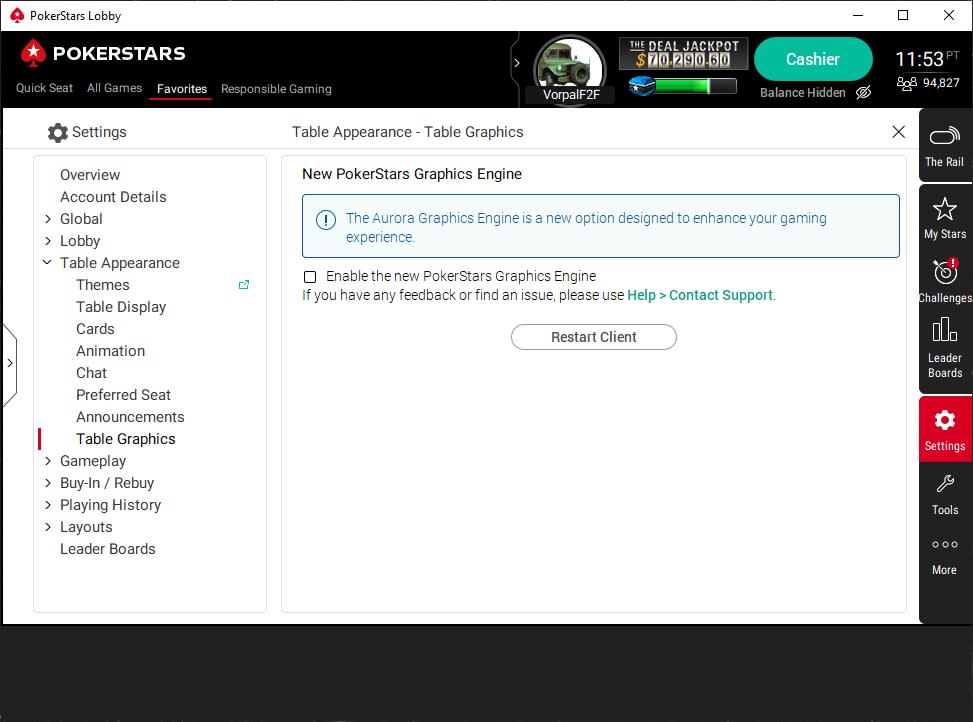
(well, except for the name, time etc  )
)
Well, there used to be such a feature. Not anymore after today update.
Originally posted by VorpalF2F
Originally posted by fidelloz
Is it possible to disable aurora engine? I cannot use hypernova layout anymore. And my pc is lagging a lot!Yes it is.
In PokerStars lobby, on right-hand side click "Settings"
Then, on Left-Hand Side, click "Table Graphics"
You should see this:
(well, except for the name, time etc
Oh dear -- I don't use the aurora graphics because it doesn't work with my table positioning script.
I could make it work, I suppose, but I have no use for useless prettiness[1] that hogs resources.
[1] Assuming that it is pretty...
Well it happened -- the new engine got installed when I opened my client -- and it specifically stated in the pop-up that there was no going back.
I sent them the following feedback:
I am devastated by the fact that I can no longer choose the old graphics engine.
There are absolutely no features of the new software that I would ever use, and one of my favourite features is missing in the new graphics.
I have attached a screenshot of the new table, and where the red circle is, there used to be a small arrow, that allowed me to popout the chat into a stack of the chat windows:
Chat
Hands
Notes
Stats
Info
This allowed me to see all of them at once for the table I was on, and better yet, when I had more than one table open, the chat windows would follow the table.
I never needed to wasted time switching from the chat to the stats to the notes and so on .I would love it if this feature could be added to the new graphics.
I would like it much better if I could dispose of the aurora graphics entirely, but sadly I very much doubt that you would do that.Finally, I notice that the new engine uses more resources than the old one did.
Not a big problem, but it might be for some.Once again, I'm dreadfully disappointed.
Regards,
--VorpalF2F
The image I mentioned is this one:
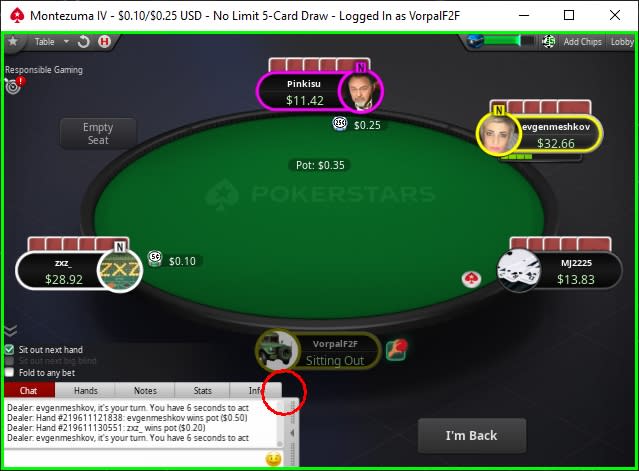
I really liked that feature -- to have all sections of the chat window open at once.
I only needed to click a player to instantly see my notes.
Sad day.


I hate it. The players who have folded don't fade away enough and I called a bet thinking I was heads up only, and not three way.
If more than one table is running it's not possible to change the felt and background colour for each table to help with multi-tabling.
My computer is handling it okay after I changed the animation settings to low but I prefer the old software much better.
Tables often sit out when one action on a table coincides with an action on another when you have all your tables stacked. That rarely happened on the old software.
It's not a total disaster but it seems Pokerstars is more interested in creating new throwables than actually making the software playable.
Great software if playing only one table. For multi-tabling it needs improving.

The biggest issue is that now with Aurora by default without option to disable it, the CPU is running too hot. Still even if you choose low quality graphics and disable all animations it kills the computer. Will they be surprise when they'll see a significant decrease in number of tables/players?

hi everyone
How can I copy the player names from the notes section while I play? 
I have lost hyper simple old theme.. 
Originally posted by Laci24
How can I copy the player names from the notes section while I play?
I have lost hyper simple old theme..
I've never needed to do this, but I tried today using several methods and found I could not.I'm also going to need to re-do my notes -- several of my notes run more then 5 lines, and that is all you get in the new graphics.
you can scroll the notes window, but you cannot enlarge it. In the old engine you could pop it outBe sure to contact support and complain
Today, while multi-tabling, the software auto folded my pocket jacks on the flop after a player donk led. I didn't accidently tick fold to a bet. This was a glitch.
It also auto folds the small blind periodically. That's why I went back to the old software after trialling the Beta Aurora. These glitches only happen when multi tabling. The folding of the small blind occurred on ipoker and 888poker. So I am thinking, something must be up at my end but what I don't know exactly.
This is the first time my hand has been auto folded on the flop at Pokerstars. But happens periodically on ipoker. Again it would appear something is up at my end. Maybe a mouse conflict? But it appears to be now much worse on Aurora.

Just played my first session with it. It's not as terrible as I feared it might be, but still pretty damn bad, and it offers no improvements I can think of over the old engine. Some of the problems can be mitigated a little by turning down animations etc, so I'd advise all of you to have a look through the setting to make it a little more tolerable.
My main issue is that the font and all the information you need is really really small now. This includes betting amounts and all, but the biggest problem to me were the infos about how many cards people are discarding in draw games. Like all other moves like betting, folding, etc this used to be displayed in the player avatar window, but now it replaces the tiny player name instead. It only pops up for around two seconds (I remember it being longer with the older design, not sure) and it is easily missable when it's that tough to make out, especially when you're multitabling. And this is some pretty vital information in draw games!
For some other infos like the game of the current round in 8-Game or the amount of draws left in Badugi I almost felt like I needed a magnifying glass, and some of the bounty information in PKOs almost looked like kanji to me without paying close attention. I admit I don't have very good eyesight, but I had to squint my eyes quite a bit to see some important infos to base my decisions on. I eventually got a little used to it, and it wasn't as bad once I got down to one table, but for multitabling, it's really very bad.
The only good thing to say about it is that it runs - for me at least. I have heard many complaints about glitches, freeze-ups and performance issues from other people. Absolutely disgraceful move on Stars' part. If you didn't know any better, you'd think it was the result of some kind of sabotage by a competitor or something.
Originally posted by Harrier88
The only good thing to say about it is that it runs - for me at least. I have heard many complaints about glitches, freeze-ups and performance issues from other people. Absolutely disgraceful move on Stars' part. If you didn't know any better, you'd think it was the result of some kind of sabotage by a competitor or something.
Be sure to let them know...

Absolute disgrace. Everything is small and blury. Hard to read. My eyes was exhausted after 1h of 6 tables, and im use to play 6 hours 12tables. Stars Helper will not work and devs will not upgrade it... I got back to old version, but the solution is only temporary. But i will stick to old version as long as i could.
In case your local app data cache is somewhere non standard, this shortcut will always work:
%localappdata%\PokerStars\ImgCache


I see a discussion on twitch about this someone saying they needed to buy a new laptop as they removed the option of using the other style and you can only use aurora now.It seems pretty absurd if you ask me and something they need to remedy quickly as you cant expect people to buy new computers to run that software as it's not in every ones budget.
Originally posted by RedsYNWA
I see a discussion on twitch about this someone saying they needed to buy a new laptop as they removed the option of using the other style and you can only use aurora now.It seems pretty absurd if you ask me and something they need to remedy quickly as you cant expect people to buy new computers to run that software as it's not in every ones budget.
I run a tool called "Open Hardware Monitor" that logs all my CPU voltages, as well as load, clocks, temperatures and fan speeds for both the GPU and CPU
I also compared the CPU usage both before and after the change (I won't dignify it as "upgrade")
Although the new graphics does indeed use more Memory (about double for me) the temperature didn't seem affected, nor did the CPU or GPU load seem affected much.
However, I have a kickass graphics card -- if the graphics processing is being offloaded to the CPU the CPU load and temperature would well be extreme.
I have heard about a couple of workarounds to get the old engine back, including some more permanent solutions that don't require you to empty the cache every time. Haven't tried any of them yet, but it looks like there are some possibilities.
I would like to point out that someone on 2+2 had asked Pokerstars support if people could possibly get banned if they keep using the old software. This was their response:
"Im very sorry I'm not aware of any way that would let you go back to the old graphics so I will not be able to assure you that there are not going to be any consequences" (...) "if there is any way, it is not approved by us"
In any case, I expect most workarounds will only work for a limited time until people catch on, so I think I'll just try to get used to Aurora as much as possible, since I assume that in the long run, I won't be getting around it anyway. If it seriously interferes with my play, maybe I'll try one of these methods.
Originally posted by RedsYNWA
It seems pretty absurd if you ask me and something they need to remedy quickly as you cant expect people to buy new computers to run that software as it's not in every ones budget.
Not to mention that having to buy a high-end PC to run a simple poker client is pretty absurd to begin with...
From what I could gather, especially Macintosh users are affected by performance issues with Aurora.
Guys new PC won't help you trust me. I have these specs and its still lagging like hell when I'm playing only 1 table... Don't know what the hell is this really, but I don't like new software at all.
Intel® Core™ i9-9900K Prozessor
Geforce® RTX 2080 Ti
32 GB RAM
Monitor 1: ASUS PG279Q - 27-inch (165 Hz) with G-SYNC
Monitor 2: ASUS VG278Q - 27-inch (144 Hz)
SSD: 2 TB, HDD: 3 TB


I use this, got it from Discord:
Spoiler
create a textfile on your desktop named aurora.bat with the following line as content:
del %LOCALAPPDATA%\ http://pokerstars.eu/ImgCache/*.* /f /q
(remove ".EU" for non-EU client)
Run this file every time before running pokerstars
I will not take any responsibility, as I don't understand a lot about tech and computers. Use at your own risk, if you like.