



.
Forum Functions for Hand Judges
In this guide you will learn:
• How to evaluate a hand and make it visible as a judged hand
• How to notify other hand judges of the thread, if you need other opinions
• How to withdraw an evaluation
• What the symbols in the two columns in the forum overview mean
.
Forum Overview

To the right of the thread's name, there is an arrow. If you want to evaluate a hand, you need to click on this arrow. You will then have access to the thread and you can evaluate it. If you do not want to evaluate the hand, you should click on the thread title itself, and not on the arrow, as otherwise, the thread will be marked as “currently being edited by [name of hand judge] “, when you leave the thread without evaluating it.
.
Thread
Once you have clicked on the arrow and gained access to the thread, there are also three further options. Normally, you would select the right option “evaluate”, write your message and click on “reply post”.

Above the “reply post” button directly in the thread there are three additional commands.
• Leave unjudged means that, once you have gained access to the thread by clicking on the arrow but don’t want to evaluate the hand, you can click to return to the forum overview and the thread will remain unmarked.
• Need help on this hand can be selected if you need the help of another hand judge, or, as the case may be, a professional hand judge. This may for example occur when the case is ambiguous and you are not able to give accurate information. The thread will then be given a question mark in the left column. Only other hand judges will then see that help is needed – the users won’t.
• You should only click evaluate when you have given a simple reply without submitting an evaluation command and want to mark the hand as “Last edited by [name of hand judge]” afterwards. This is the standard procedure for a completed hand evaluation. Hands that were unjudged before or have been marked by users as having an additional question will add a hand evaluation to your personal counter (important for professional judges in order to get paid)
.
The columns in the forum overview – Left professional, right voluntary
The left column shows the activities of the professional hand judges, the right column those of the voluntary judges and members.
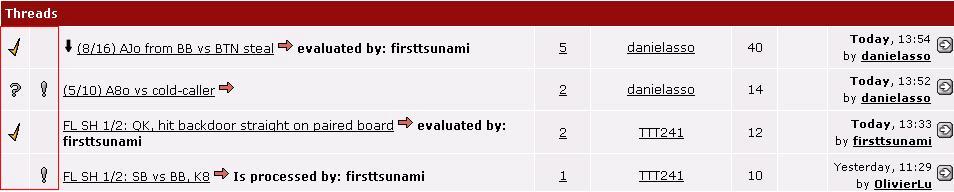
• A check mark means that a hand judge has posted a concluding reply and evaluation for the thread.
• An exclamation mark means that a user sent in a contribution via the reply option “Advise the judge to take another look at this thread“, but that the thread has already been evaluated. “Evaluated by” has been removed and the hand judge now knows that he needs to take another look at the thread to clarify further questions.
• The question mark means that a hand judge has asked for help. The question mark is not visible to the user.